What's new

Every change to Leafline, newest first.

14 October 2026 Latest

Leafline 3.0

A new reader, a bar that folds away, and a tidier app.

A new reader

Contents, search and type now sit under your thumb. The type sheet opens halfway, so you watch the page change as you choose. There are two new typefaces too.

Try it. Pick a page, a typeface or a size.

Pride and PrejudiceChapter I

It is a truth universally acknowledged, that a single man in possession of a good fortune, must be in want of a wife.

However little known the feelings or views of such a man may be on his first entering a neighbourhood, this truth is so well fixed in the minds of the surrounding families, that he is considered as the rightful property of some one or other of their daughters.

“My dear Mr. Bennet,” said his lady to him one day, “have you heard that Netherfield Park is let at last?”

Type & page

Page

Type

Know where you are

The line at the bottom is the whole book, with a notch for each chapter. Tap it to see how long is left. If you jump somewhere, a Back button returns you to your page.

Try it. Drag along the line.

Pride and PrejudiceChapter VII

Now reading

Chapter VII

A note for Miss Bennet

4 minleft in this chapter
6 h 7 minleft in the book
p. 110 of 84313%

A bar that folds away

Scroll down and the bottom bar folds into one button in the corner. Tap the button to bring it back.

Try it. Scroll inside the phone.

Home

Continue reading

Pride and Prejudice

Resume

Also on the go

Books

Audiobooks

Finished

Scroll the page
Home Shelf Circle Search

A cleaner Home

The top card has one button: Resume. Profile sits beside the bell, and audiobooks stand as tall as books so the rows line up.
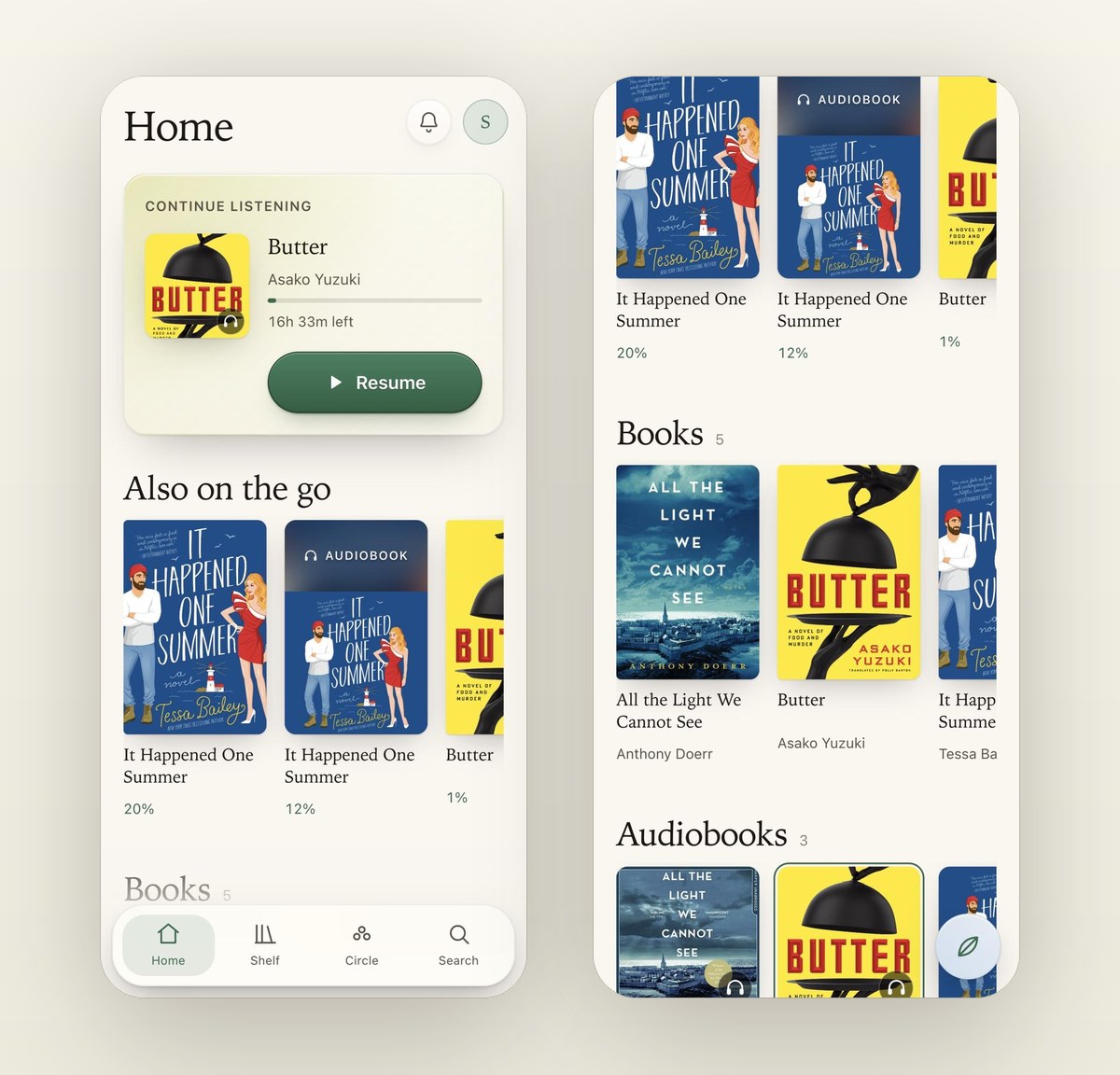
Home on a phone, with a Resume button on the top card and a row of books and audiobooks at the same height.

Built for bigger screens

On a tablet or computer, Home, Shelf and Search were a phone layout stretched wide. Now the book you are on sits beside your others, and the jackets are bigger.
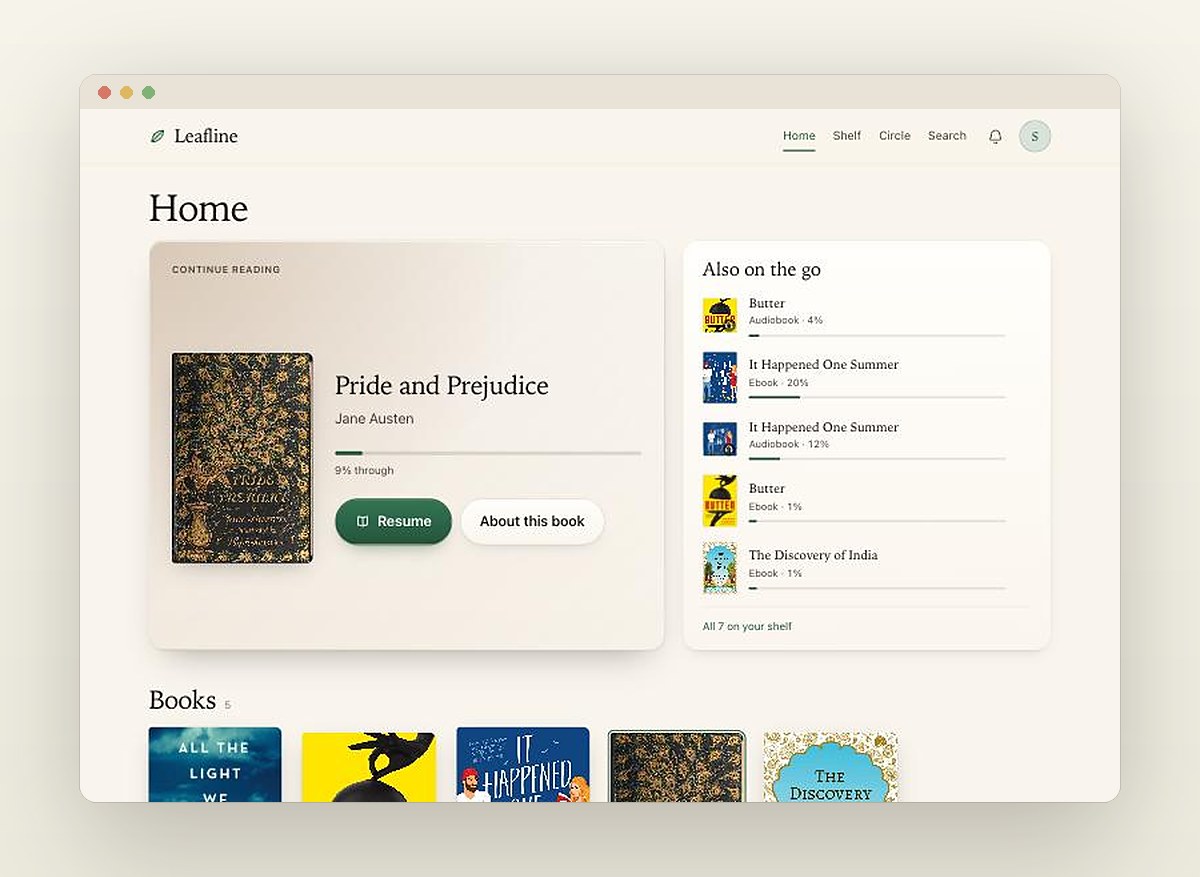
Home on a computer: the book being read beside a list of the others that are open, with the library as a grid below.

Fixed

  • Listening time counts whenever a book is playing, screen on or off.
  • Reading time stops when you stop. A book left open no longer counts for hours.
  • Search inside a book now works in every book.
  • Letters are no longer cut off at the edge of a phone while scrolling.
  • The number on the bell no longer covers the bell.
Everything in 3.0 36 changes
New
  • The ebook reader is rebuilt, with one set of drawn buttons. On a phone, contents, search and type sit at the bottom.
  • Type & page replaces the settings box. It shows page colours and typefaces as previews, and opens halfway on a phone so you can see the page change.
  • Two new typefaces for long reading: Literata and Source Serif.
  • The line at the bottom of the reader shows the whole book: its chapters, your Moments, and friends reading the same book if their shelf is public.
  • Tap the bottom bar in the reader to see how long the chapter and the book have left, and to jump to any chapter.
  • Contents, search and Moments share one panel. Search looks as you type and groups what it finds by chapter.
  • After any jump in a book, a Back button returns you to the page you left.
  • On a phone, the bottom bar folds into one button when you scroll, and opens when you tap it.
  • Profile is now about your reading: your run of days, what you have open, your Moments and your year. Settings have their own page.
  • What's new is a page anyone can open, and the big releases are told as a story with pictures.
Better
  • A book opens on its jacket instead of a spinner.
  • On a wide screen the text keeps to the width of a printed page.
  • Chapter names are tidied, and a picture caption that was part of the name now sits beneath it.
  • Home, Shelf and Search are laid out for tablets and computers instead of being stretched from a phone.
  • The card on Home has one button, Resume, and tells you how long an audiobook has left.
  • Where a row mixes books and audiobooks, the audiobooks stand as tall as the books.
  • Profile sits beside the bell, and the bottom bar keeps the four places you move between.
  • Buttons, cards and filters have depth, and the main button can be read at night.
  • Reading in Scroll, the text fills the screen and the bars float over it.
  • The small player shows how far through the book you are as a ring round the play button, with the time left.
  • Jackets fade in and lift when you point at them, and two heavy covers load much faster.
  • Your year in reading opens with the year in one sentence.
  • Activity lists everything the bell does, including new books and new versions.
  • The page shown before signing in shows the reader as it is today.
Fixed
  • Margins now work while scrolling. Text used to run to the edge of a phone and lose the first and last letter of each line.
  • Search inside a book found nothing at all in some books.
  • Tapping the page to hide the bars did nothing while scrolling.
  • Reading page by page on a computer, the page sat against the left edge.
  • A book opened in a tab you were not looking at said it was taking too long to open.
  • Listening time missed anything played from the small player or with the screen off, and counted books that were paused.
  • A book left open on screen counted as reading for as long as it sat there.
  • The number on the bell covered the bell, and could stay after you had read everything.
  • Activity described a new book as a reply to your Moment.
  • Choosing a typeface on a phone closed the sheet you were choosing it in.
  • The page shown before signing in had two broken pictures.
  • The highlighted tab in the bottom bar sat too close to the bar's edge.
2.1

9 October 2026

Every book gets a proper page of its own.

New
  • Each book has a proper page now. The jacket sits large at the top in its own colours, with how long the book is, how much you have left, and — for audiobooks — its chapters, with the one you are in marked.
  • When a book is in the library as both an ebook and an audiobook, each page points to the other and shows how far through it you are.
  • A book page shows who else is reading it and how far they have got. Only people with Public shelf switched on appear — the same setting that already decides who can see your shelf.
Better
  • On a tablet or a computer the book page uses the whole screen, and the jacket and its buttons stay beside you as you scroll down, instead of sitting in a narrow strip with empty space around it.
  • On a phone, once you scroll past the buttons, a slim bar with the book and its Continue button follows you at the top, so you never have to scroll back up to start.
  • Lengths read the way people say them — 17 hr 12 min rather than 17:12:09 — on book pages and in Search.
Fixed
  • Finishing an ebook never counted. The last page of a book stops just short of the very end, so the app went on offering to continue it, left it out of your finished books, and never asked what you thought of it. It now knows when you have reached the end.
  • If you read the same book on two devices, the one you closed last could pull you back to wherever it had been. The place you most recently reached now always wins, on any device.
  • Brightness worked backwards: sliding it up made the page darker. Up now means brighter.
  • Margins could be set to nothing, which cut off the first and last letters of every line. The narrowest margin now keeps every letter on screen, and the widest no longer squeezes a phone down to a few words a line.
  • The Legible typeface was not really loading, so most devices quietly showed Verdana instead. It now shows Atkinson Hyperlegible, the face designed for easier reading that it was always meant to be.
  • Opening an ebook from inside the app — from its page, from Home or from the Shelf — could sit loading for half a minute and then fail. Only refreshing the page got you in. Books now open straight away however you get to them.

9 September 2026

Leafline 2.0

The player no longer stops when you look at something else — and most of the app was rebuilt around that.

A book that keeps playing

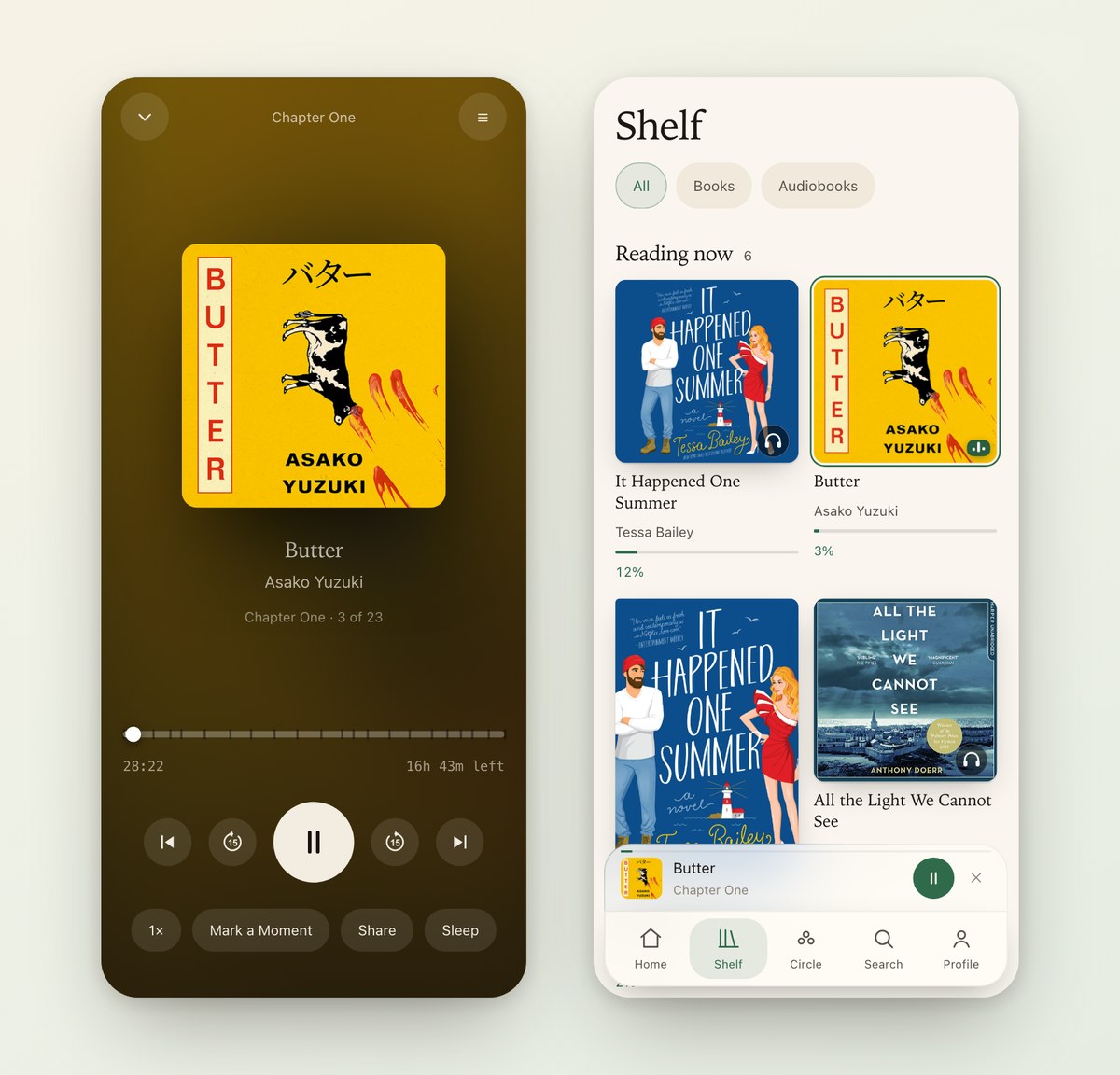
The player used to stop the moment you left it. Now the book carries on in a bar above the tabs while you look around, and it holds your place on long audiobooks instead of jumping back to the start.

The full audiobook player, and beside it the Shelf with the same book still playing in a bar above the tabs.

A sleep timer that finishes the sentence

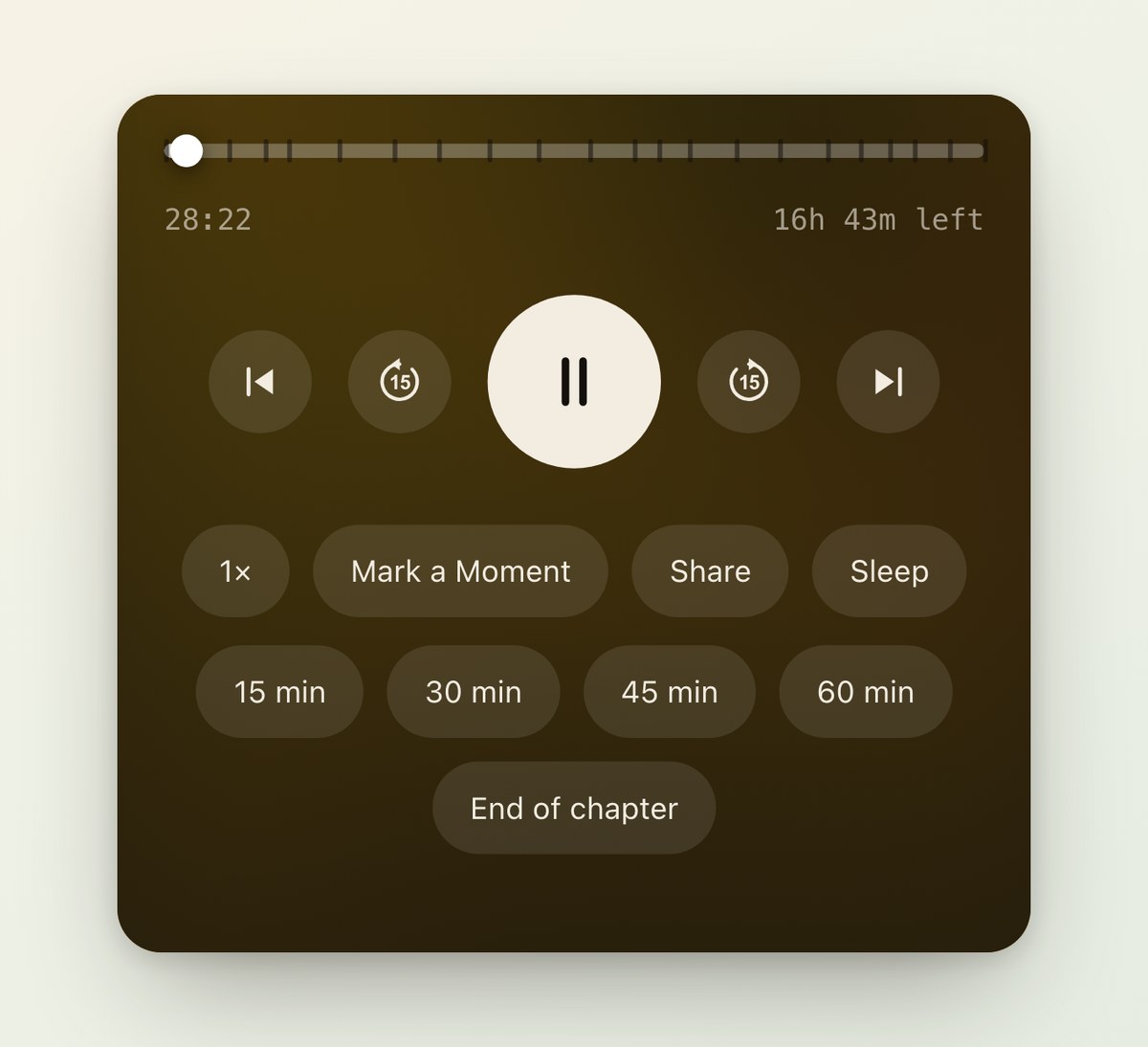
Pick 15, 30, 45 or 60 minutes, or End of chapter. The sound fades out over the last twenty seconds instead of stopping dead.

The sleep options in the player: 15, 30, 45 and 60 minutes, and End of chapter.

A bell

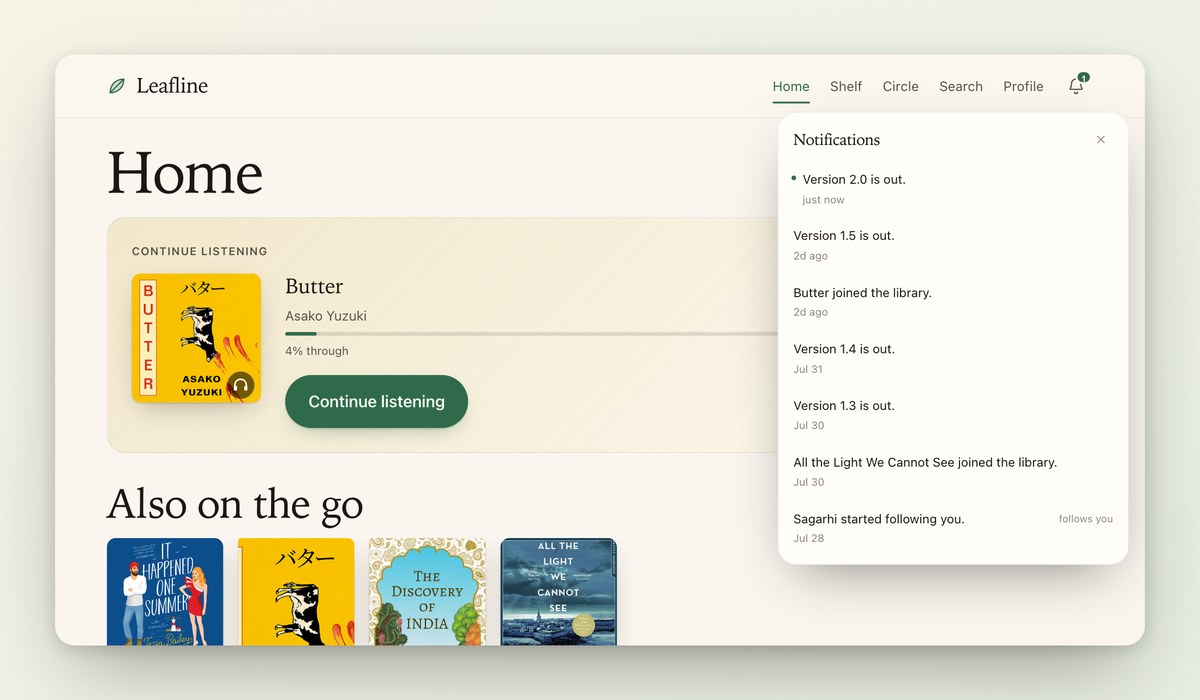
Replies, follows, new books and new versions arrive in one place, top right. Before this, a reply to your Moment told nobody.

Leafline on a computer with the notification panel open beside the bell.

Quicker

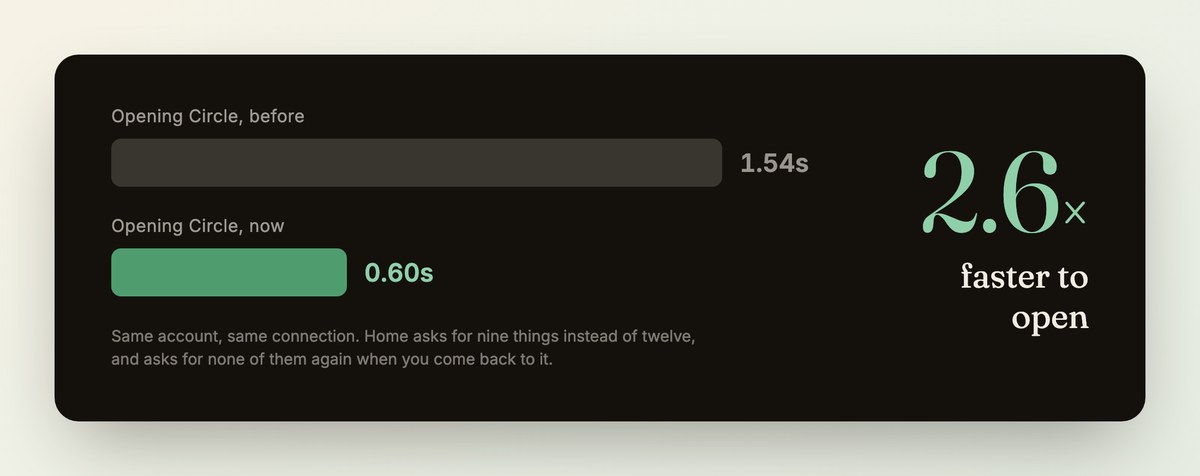
Moving between Home, Shelf and Circle is about two and a half times faster.

A chart: opening Circle took 1.54 seconds before and takes 0.60 seconds now.
Everything in 2.0 24 changes
New
  • The sleep timer can now finish the chapter you are in, rather than only counting down minutes — so it stops at the end of a passage instead of halfway through a sentence.
  • Sleep can be set to 15, 30, 45 or 60 minutes. It used to be 30 minutes or nothing.
  • An audiobook keeps playing when you leave the player. A slim bar stays at the bottom with what is playing, so you can look through the shelf or the Circle without stopping your book. Tap it to go back to the full player.
  • The player shows the Moments you have marked in that book: small marks along the scrubber where you left them, and a list beside the chapters. Tap one to jump straight there.
  • A bell collects everything worth telling you: replies to your Moments, follows, reactions, books joining the library and new versions. Top right on every size — beside the heading on a phone, in the header on a computer.
  • The book you are on is marked wherever its cover appears — on the Shelf, in Search, anywhere. A thin ring around the jacket shows which one you would pick back up, and if it is playing, three small bars move in the corner. They stand still when you pause.
Better
  • Moving between Home, Shelf and Circle is instant. The app used to fetch the same things again on every page; it now remembers what it just loaded.
  • The home page finishes loading about half a second sooner, and tapping a tab no longer pauses while it fetches the page.
  • Pages fade into one another instead of snapping, and a book cover you tap carries across onto that book’s page.
  • Opening a book shows its jacket, title and author while it loads, instead of a blank screen with a spinner.
  • The player’s buttons are drawn properly now, with the familiar circular arrows. Skip moves fifteen seconds in both directions.
  • If you have asked your device for reduced motion, none of this animates. It simply changes.
  • The sound fades away over the last twenty seconds instead of stopping dead, which is gentler if you are drifting off.
  • Opening the chapter list takes you to the chapter you are on, instead of the top of a list of twenty-three.
  • That bar now sits flush against the tab bar as a single piece, in the app’s own colours, instead of floating above it as a separate dark strip.
  • The button that puts the player away is a downward arrow rather than a cross, because the book carries on playing in the bar below.
  • The skip buttons are redrawn: the number sits cleanly inside the arrow instead of the two crossing over each other.
  • Leafline now records which screens get opened, so decisions about how it is laid out rest on what you actually use. It stores the name of the screen and nothing else — never which book, never what you searched for.
Fixed
  • Audiobooks no longer jump back to the beginning while you are listening. The player holds your exact place, even if it has to reconnect part-way through a long book.
  • Continue reading now shows the book you actually put down last, rather than whichever one you happen to be furthest through.
  • Your progress is yours alone. If someone else in your circle was reading the same book, their position could show up on your home page, and occasionally the player would start from where they had got to.
  • Where you stopped is saved when you pause or close the tab, not only while you keep listening.
  • On an iPad the bar ran underneath the sidebar, hiding the cover and half the title. It now starts where the page does.
  • Replies to your Moments never notified anyone. Someone could answer you and you would only find out by going to look. They appear in the bell now.

1.5

7 September 2026
New
  • Butter by Asako Yuzuki is in the library, as both an ebook and a seventeen-hour audiobook read by Hanako Footman.
Better
  • Dropping in an audiobook now fills in its title, author, narrator and cover automatically, straight from the file.
Fixed
  • Adding a book through the admin page works. The upload always finished, but the book never actually appeared on the shelf.
  • An ebook and an audiobook of the same title no longer overwrite each other’s cover art.

1.4

31 July 2026

Streaks, replies, searching inside a book, and a look back at your year.

New
  • You can search inside a book for any word or phrase, and tap a result to jump straight to that page.
  • Your year in reading: everything you finished, how long you spent, your busiest month, and a quote you saved.
  • Reading streaks — how many days in a row you have read, and your best run so far.
  • You can reply to a Moment, so marking a passage can start a conversation.
  • When you finish a book, you are asked what you made of it, and can share that with your circle.

1.3

30 July 2026
New
  • A private console for managing the library, behind its own passcode.
Better
  • Books now show the year they were written, rather than the year this particular copy was printed.
Fixed
  • Audiobook chapters show their real names instead of numbers.